The best microphone depends less on hype and more on what you’re recording: live vocals, podcasts, streaming, studio vocals/instruments, or wireless run-and-gun audio. In practice, the right choice comes down to your room noise, connection type (USB vs XLR vs wireless), the gear you already own, and how much setup you’re willing to do.
This SelectRanker guide keeps it simple with a microphone comparison built around real fit checks. You’ll see where each mic works best, what it plugs into, what you may need to add (interface, cable, stand/boom, wind protection), and the tradeoffs each option makes.
If you’re also shopping other gear, jump to the hubs at Best Products hub, Tech hub, and Audio Video hub. For related picks, see Best Headphones and Best Projector.
Top 3 Microphones
Compare the first three reviewed products at a glance.
Disclosure: As an Amazon Associate, SelectRanker may earn from qualifying purchases. We may also earn from other affiliate links. This does not change what we recommend or how we compare products.
#1

Shure SM58 Pro XLR Dynamic Vocal Microphone
Editor's Pick
Our top-three picks Rating
Best for
Live vocals, rehearsals, and general-purpose XLR use
Key feature
Dynamic “stage standard” sound with feedback-resistant practicality
#2

FIFINE AmpliGame AM8 USB/XLR Dynamic Microphone for Gaming Streaming
Strong Choice
Our top-three picks Rating
Best for
Streaming/gaming setups that want USB now and XLR later
Key feature
USB + XLR flexibility for upgrading your chain over time
#3
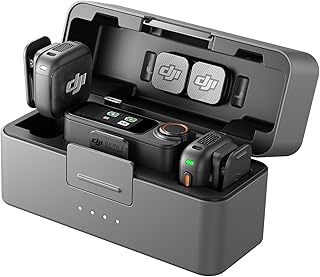
DJI Mic 3 (2 TX + 1 RX + Charging Case), Wireless Microphone
Featured Pick
Our top-three picks Rating
Best for
Wireless creators who need fast setup for camera/phone audio
Key feature
2-transmitter wireless kit with a charging case for grab-and-go shoots
This page compares 5 product options, focused on real buying decisions:
- Use-case and fit, including who the product is for, where it will be used, size or fit, portability where relevant, and expected frequency of use
- Performance and compatibility, including the category-specific specifications, dimensions, capacity, connectivity or power needs, included accessories, and setup that affect real use
- Ownership risk, including maintenance, recurring costs, replacement parts, subscriptions where relevant, warranty/support, returns, and long-term value
SelectRanker connects each comparison to the most relevant category hub, related product comparisons, and practical buying guides so you can check the wider context before ordering.
Best Microphones 2027: Top 5 Picks Compared
| Image | Product | Best for | Key feature | View on Amazon |
|---|---|---|---|---|
| Shure SM58 Pro XLR Dynamic Vocal MicrophoneShure SM58 Pro XLR Dynamic Vocal Microphone | Live vocals, rehearsals, and general-purpose XLR use | Dynamic “stage standard” sound with feedback-resistant practicality | View on Amazon |
| FIFINE AmpliGame AM8 USB/XLR Dynamic Microphone for Gaming StreamingFIFINE AmpliGame AM8 USB/XLR Dynamic Microphone for Gaming Streaming | Streaming/gaming setups that want USB now and XLR later | USB + XLR flexibility for upgrading your chain over time | View on Amazon |
| DJI Mic 3 (2 TX + 1 RX + Charging Case), Wireless MicrophoneDJI Mic 3 (2 TX + 1 RX + Charging Case), Wireless Microphone | Wireless creators who need fast setup for camera/phone audio | 2-transmitter wireless kit with a charging case for grab-and-go shoots | View on Amazon |
 | RØDE NT1 Signature Series Studio Condenser Microphone, BlackRØDE NT1 Signature Series Studio Condenser Microphone, Black | Home studio recording where room sound and detail matter | Condenser detail for vocals/instruments (best in a controlled space) | View on Amazon |
 | Shure SM7B Dynamic Vocal Microphone for Podcasting & StreamingShure SM7B Dynamic Vocal Microphone for Podcasting & Streaming | Podcasting/streaming voices in less-than-perfect rooms | Broadcast-style dynamic tone that helps reduce room noise pickup | View on Amazon |
1) Shure SM58 Pro XLR Dynamic Vocal Microphone — Live vocals, rehearsals, and general-purpose XLR use
Shure SM58 Pro XLR Dynamic Vocal Microphone is a safe “start here” option when you want a dependable, widely compatible XLR mic for real-world voice use. It’s especially well-suited to live sound and straightforward recording setups.
Best for: Live vocals, rehearsals, and general-purpose XLR use
Key feature: Dynamic “stage standard” sound with feedback-resistant practicality
Watch for: Confirm you have (or plan to buy) the right XLR chain: an audio interface/mixer, an XLR cable, and a stand/clip. If you’re unsure how it will match your voice or room, double-check return terms before ordering.
🧐 Quick verdict: Best overall baseline for “I need one mic that just works” in common vocal situations—especially on stage or in noisy environments.
| Pros ✅ | Cons ⚠️ |
|---|---|
| ✅ Reliable, no-nonsense choice for vocals and general use | ⚠️ Requires XLR gear (interface/mixer + cable) to connect to a computer/phone |
| ✅ Good pick when you want practical performance over “studio” fragility | ⚠️ Not the first choice if you want maximum detail for quiet studio vocals |
| ✅ Makes it easier to compare other mics against a known baseline | ⚠️ Your stand/boom and placement still matter a lot for results |
Why it’s a top pick: For many buyers, the “best microphone 2027” isn’t the most sensitive or most expensive. Instead, it’s the mic that stays usable across different rooms, different users, and different setups. This pick also gives you a practical reference point for comparing everything else on the list.
Decision bullets
- Use-case check: best fit for spoken voice or singing where durability and straightforward setup matter.
- Setup check: plan your full chain (mic stand/boom, cable, and interface/mixer if recording to a computer).
- Workflow check: placement technique (distance and angle) often matters more than small spec differences in microphone reviews.
SelectRanker tip: Before you buy, decide whether you need USB convenience or XLR flexibility. Then choose the mic that matches that decision.
2) FIFINE AmpliGame AM8 USB/XLR Dynamic Microphone for Gaming Streaming — Streaming/gaming setups that want USB now and XLR later
FIFINE AmpliGame AM8 USB/XLR Dynamic Microphone for Gaming Streaming earns the value slot for buyers who want to get started quickly on a PC (USB). Later on, you can move to an interface/mixer (XLR) without replacing the mic.
Best for: Streaming/gaming setups that want USB now and XLR later
Key feature: USB + XLR flexibility for upgrading your chain over time
Watch for: Confirm what’s included versus what you still need (boom arm/stand, cable for XLR use, monitoring). If you plan to rely on software controls, verify OS/app compatibility before committing.
🧐 Quick verdict: Best value if you want an easy start today and a realistic upgrade path tomorrow.
| Pros ✅ | Cons ⚠️ |
|---|---|
| ✅ Flexible connection options for typical creator setups | ⚠️ “Best” depends on your room noise and mic placement, not just features |
| ✅ Can reduce upgrade regret if you later move to XLR gear | ⚠️ You may still need accessories (stand/boom, shock mount, etc.) for best results |
| ✅ Strong pick for budget-focused microphone comparison shopping | ⚠️ Verify monitoring/controls and any software behavior before committing |
Why it’s a top pick: Many buyers want a strong microphone for streaming without buying an interface on day one. This pick matches that workflow: start simple, then expand your setup if your needs grow.
Decision bullets
- Use-case check: ideal when you’re recording at a desk and want a straightforward PC connection.
- Tradeoff check: convenience features help, but they don’t replace room control and good mic placement.
- Compatibility check: confirm your intended device (PC/console) and your preferred connection type (USB or XLR).
SelectRanker tip: If you’re choosing between USB and XLR, pick your workflow first. Plug-and-play is simpler, while a modular chain offers more control but needs more gear.
3) DJI Mic 3 (2 TX + 1 RX + Charging Case), Wireless Microphone — Wireless creators who need fast setup for camera/phone audio
DJI Mic 3 (2 TX + 1 RX + Charging is the pick for creators who can’t stay on-mic at a desk. If you film, interview, teach, or vlog, a wireless kit can be the difference between usable audio and a take ruined by wind or room echo.
Best for: Wireless creators who need fast setup for camera/phone audio
Key feature: 2-transmitter wireless kit with a charging case for grab-and-go shoots
Watch for: Verify device compatibility (camera vs phone vs computer), any required adapters, and your typical recording environment (wind, clothing noise, distance, interference). Wireless adds convenience, but it also adds setup checks.
🧐 Quick verdict: Best when mobility and speed matter more than a traditional studio mic workflow.
| Pros ✅ | Cons ⚠️ |
|---|---|
| ✅ Solves the “I can’t stay close to a mic” problem | ⚠️ Wireless systems require compatibility and connection planning |
| ✅ Great for two-person shoots, interviews, and run-and-gun content | ⚠️ Wind/clothing noise control still matters (placement and accessories) |
| ✅ Helps keep audio consistent when you move around | ⚠️ Charging and storage workflow becomes part of ownership |
Why it’s a top pick: In real creator workflows, the best microphone is often the one you’ll use correctly every time. With wireless, you can keep levels more consistent while moving, filming yourself, or recording two people.
Decision bullets
- Performance check: prioritize clean speech capture and consistent levels over “studio” marketing language.
- Compatibility check: confirm how you’ll connect to your phone/camera/computer and what adapters you may need.
- Workflow check: plan charging habits, storage, and how you’ll manage wind protection and clothing placement.
SelectRanker tip: If your content includes movement, distance, or outdoor shooting, solve the placement problem first. After that, choose the mic type that fits.
4) RØDE NT1 Signature Series Studio Condenser Microphone, Black — Home studio recording where room sound and detail matter
RØDE NT1 Signature Series Studio Condenser Microphone is the studio-focused choice for buyers who want condenser-style detail for vocals and instruments. It makes the most sense when you can control your recording space enough to benefit from that sensitivity.
Best for: Home studio recording where room sound and detail matter
Key feature: Condenser detail for vocals/instruments (best in a controlled space)
Watch for: You’ll typically need an XLR interface with phantom power for condenser mics, plus a stable stand/boom and basic room control (quiet space, sensible placement). If your room is loud or echoey, a dynamic mic may be easier to manage.
🧐 Quick verdict: Best for “studio-style” recordings when your space and setup can take advantage of a condenser’s detail.
| Pros ✅ | Cons ⚠️ |
|---|---|
| ✅ Strong fit for detailed recording in a controlled environment | ⚠️ More sensitive to room echo/noise than many dynamic mics |
| ✅ Great when you want clarity for vocals and instruments | ⚠️ Usually needs an interface with phantom power and proper placement |
| ✅ Good choice for buyers building a home studio workflow | ⚠️ Extra accessories (stand, pop filter, shock mount) may be needed |
Why it’s a top pick: If your goal is a more “produced” sound, the mic needs to capture detail and your room has to cooperate. This pick is for buyers who can control the environment enough that a condenser mic’s sensitivity becomes an advantage, not a problem.
Decision bullets
- Fit check: best for a desk/stand setup in a quieter room, not a noisy shared space.
- Setup check: confirm you have an interface that supports the mic type and the connections you need.
- Workflow check: plan for pop control and consistent mic distance for repeatable takes.
SelectRanker tip: If your recordings sound “roomy,” fix placement and room reflections first. Upgrading microphones won’t remove echo by itself.
5) Shure SM7B Dynamic Vocal Microphone for Podcasting & Streaming — Podcasting/streaming voices in less-than-perfect rooms
Shure SM7B Dynamic Vocal Microphone for Podcasting & Streaming is the purpose-built option for spoken-word creators who want a broadcast-style dynamic mic for podcasts, streaming, and voiceover. It’s a strong fit when the room isn’t acoustically perfect.
Best for: Podcasting/streaming voices in less-than-perfect rooms
Key feature: Broadcast-style dynamic tone that helps reduce room noise pickup
Watch for: Dynamic broadcast mics often need the right gain/level from your interface, and you’ll want a solid boom arm plus good technique (close distance, consistent angle). Before ordering, verify what additional gear you may need to reach your target recording level cleanly.
🧐 Quick verdict: Best when your priority is a polished voice sound and better control over room noise in a typical home setup.
| Pros ✅ | Cons ⚠️ |
|---|---|
| ✅ Strong match for spoken-word content and close-mic technique | ⚠️ Requires an XLR recording chain and a sturdy mounting solution |
| ✅ Often easier to manage in untreated rooms than many condensers | ⚠️ Your interface/gain setup matters; plan your full signal chain |
| ✅ Great “creator workflow” mic when you record frequently | ⚠️ Not the simplest or cheapest route for casual, occasional use |
Why it’s a top pick: For podcasting and streaming, consistency is king. This pick focuses on a repeatable voice sound with fewer “my room ruined it” surprises, as long as you’re willing to use close-mic technique and support it with the right gear.
Decision bullets
- Budget check: include the full setup (interface, boom arm, cable, pop/wind protection) when comparing total cost.
- Use-case check: best when you record voice often and want a “broadcast” style sound.
- Risk check: confirm your interface can deliver clean levels and that your desk/mounting setup can handle the mic securely.
SelectRanker tip: If your mic will live on a boom arm, prioritize a stable mount and consistent placement. Those two details often matter more than chasing another mic upgrade.
How we evaluate best microphone options
The SelectRanker scoring lens
To recommend microphones that make sense for online buyers (and not just spec sheets), we focus on what changes real recordings and day-to-day ownership:
- Use-case match, including who the mic is for, recording environment (treated room vs echoey room vs outdoors), and how close you can stay to the mic
- Useful specifications, focusing on mic type and workflow realities (dynamic vs condenser vs wireless), plus the practical constraints that affect results
- Compatibility and setup, including USB vs XLR vs wireless receiver needs, phantom power where relevant, and required accessories like stands/booms and cables
- Usability and ownership, including controls, monitoring, portability, storage, charging where relevant, and how easy it is to get consistent audio quickly
- Ownership risk, including replacement accessories, long-term support, return difficulty, and the “hidden costs” (interface, mounts, adapters) that can change the value
Before you buy: best microphone
Skip or slow down if these apply
Don’t buy this if…
- You haven’t decided whether you need USB convenience, XLR flexibility, or a wireless system for on-camera work.
- You’re buying a condenser mic for an echoey/loud room and expecting it to “fix” bad acoustics.
- You haven’t checked what extra gear is required (interface, phantom power, boom arm/stand, cables, adapters, wind protection).
- The listing is unclear about what’s included in the box and what you must add to actually record.
- You can’t return it easily if it doesn’t match your voice, room, or workflow.
Good signs you are ready to buy
Buy this if…
- You know your main recording scenario (podcast desk setup, streaming, live vocals, studio recording, or wireless filming).
- You’ve chosen your connection type (USB/XLR/wireless) and verified compatibility with your computer, camera, or phone.
- You’ve planned the full setup: mounting, cables/adapters, interface/phantom power where needed, and basic noise control.
- You want a clear shortlist from real microphone reviews and comparisons instead of endless scrolling.
Buyer’s guide to best microphone
Start with the buyer and real use case
“Microphone 2027” shopping is really workflow shopping. A desk podcast setup, a live stage vocal, a home studio vocal chain, and a wireless creator rig all reward different mic types and accessories. Start by writing down where you’ll record, how close you can stay to the mic, and what you’re plugging into.
Performance and features: compare what actually matters
The biggest spec number rarely picks the right mic. Instead, compare the parts that change your audio in practice: mic type, placement distance, noise pickup, and whether your recording chain supports the mic properly.
- Performance: prioritize intelligibility and consistency (especially for spoken word) over marketing terms.
- Capacity and size: make sure the mic physically fits your desk/boom setup and doesn’t force awkward positioning.
- Controls and usability: consider how you’ll monitor audio, adjust levels, and manage gain in your workflow.
- Portability and setup: wireless kits and travel setups win on speed, but require charging and adapter planning.
Compatibility, size, setup, and ecosystem
Most “wrong mic” purchases are actually “wrong setup” purchases. Before ordering, verify the connection path end-to-end: USB to computer, XLR to interface/mixer, or wireless receiver to camera/phone. Also confirm you have the right stand/boom and any needed adapters.
If two products solve the same need differently, use the related SelectRanker comparison and buying guides supplied with the page to understand the tradeoff before buying.
Build quality, usability, and included accessories
A mic that sounds good but doesn’t mount well (or forces bad placement) can underperform fast. Check mounting needs, included clips/stands, wind/pop protection, and whether you’ll need a sturdier boom arm for your desk setup.
Maintenance, recurring costs, parts, and ownership
Microphones themselves don’t usually have big consumable costs, but your system might. Cables, adapters, shock mounts, windscreens, wireless charging habits, and interface upgrades can all add up. Budget for the full chain so “best value” stays best value.
Warranty, returns, support, and long-term value
Audio gear is sensitive to compatibility and expectations. For that reason, verify manufacturer guidance, return terms, and support before buying—especially for wireless systems, higher-priced studio mics, or anything you can’t easily return once opened.
Decision table: buyer concern → what it means → what to check
| Concern | Likely cause | What to check before buying |
|---|---|---|
| The mic sounds thin, noisy, or “far away” | Wrong mic type for the room, poor placement, or a mismatched recording chain | Confirm USB vs XLR vs wireless needs, check placement distance, and verify your interface/mixer settings where relevant |
| The mic won’t connect to my device | Connector/adapter needs were overlooked (USB vs XLR vs receiver output) | Verify device compatibility, required adapters, and what’s included in the box |
| Audio is echoey or picks up too much room noise | Room reflections/noise floor plus a sensitive mic choice | Consider a dynamic mic for untreated rooms, improve placement, and reduce reflections/noise sources |
| Levels are too quiet or distorted | Gain staging issues, interface limitations, or wrong input type | Confirm your interface/mixer supports the mic properly and that your workflow supports clean recording levels |
| Wireless audio cuts out or is inconsistent | Interference, distance, placement, or charging/connection issues | Check your typical shooting environment, connection path, and charging/storage workflow |
| Ownership cost is higher than expected | Extra gear required (boom arm, interface, cables, adapters) | Price the full setup, not just the microphone body |
| The feature list feels confusing | Mixing categories (USB mics vs XLR mics vs wireless kits) in one comparison | Return to the real need: where you record, how you connect, and how you’ll mount and monitor |
Use the related SelectRanker guides below for deeper category-specific sizing, fit, compatibility, setup, maintenance, and ownership questions.
Common mistakes and quick wins
Quick wins before you buy
- Choose the connection first. USB is easiest for a computer; XLR is modular (but needs an interface/mixer); wireless is for mobility.
- Fix placement before upgrading. Getting the mic closer (with proper pop control) often improves clarity more than switching models.
- Read “bad review” patterns. Look for repeated complaints about connectivity, software, weak mounts/threads, charging issues (wireless), or return problems.
- Budget for the full chain. A boom arm, cable, and interface can change which pick is truly best value.
Common mistakes
- Buying a studio condenser for a loud/echoey room and expecting it to sound “pro” without room control.
- Assuming XLR mics plug directly into a computer without additional gear.
- Choosing a wireless kit without confirming adapters and your camera/phone input needs.
- Ignoring mounting and placement (desk stand vs boom arm) until after the mic arrives.
- Comparing microphone reviews without matching the reviewer’s room and recording chain to your own.
For deeper context, continue with the related SelectRanker guides covering sizing, specifications, compatibility, setup, maintenance, and closely related product comparisons for this topic.
Related SelectRanker guides
- Explore the broader SelectRanker category guide for this product type. Audio Video hub
- Compare the closest alternative product category when the buying decision is not clear-cut. Best Headphones
- Use the related sizing, specification, compatibility, setup, or maintenance guide for the detail that matters most before buying. Laptop Specs Guide
- Check another closely related SelectRanker comparison when a different use case, budget, or feature priority may change the best choice. Best Projector
FAQs
1) What matters most when choosing the best microphone?
Start with (1) your use case (podcast/streaming, live vocals, studio recording, or wireless filming), then (2) your connection type (USB, XLR, or wireless receiver), and (3) your recording environment (quiet/treated vs echoey/noisy). After that, confirm the full setup you’ll need—stand/boom, cables, interface/phantom power where relevant, and return terms.
2) USB vs XLR: which connection is better for a home recording setup?
USB is usually the simplest for a computer-based setup because it’s typically plug-and-play. XLR is a better fit when you want a modular chain (interface/mixer, multiple mics, more control), but it requires additional gear. If you’re filming or moving around, a wireless system may be the most practical option.
3) Dynamic vs condenser: which mic type is better for voice?
Neither is universally better. Condensers can capture more detail, but they also tend to pick up more room sound—great in a controlled space, frustrating in echoey rooms. Dynamic mics are often easier to manage in everyday rooms for spoken word and streaming, especially with close-mic technique.
4) What compatibility checks should I do before ordering a microphone?
Check (1) what you’re recording into (PC, camera, phone, mixer), (2) the connection path and adapters needed, (3) whether you need phantom power (common for XLR condensers), and (4) mounting needs (desk stand vs boom arm, thread compatibility). Finally, confirm what’s included in the box.
5) When is a premium microphone worth it?
A premium mic can make sense if you record frequently, need a specific sound profile, or want a mic that fits a more demanding workflow (broadcast-style voice work, studio vocals, or reliable wireless capture). For occasional calls or casual content, you may get a bigger improvement from better placement, lower room noise, or a more suitable recording chain.
6) How can I use microphone reviews without buying the wrong model?
Match the reviewer’s setup to yours: room acoustics, mic distance, interface/mixer, and intended use. A mic that sounds great in a treated studio can sound harsh or echoey in a bare room. Use reviews to spot patterns (build issues, connectivity problems, weak mounts), then decide based on your environment and workflow.
7) What are the most common hidden costs with microphones?
The recording chain and accessories add up. XLR mics often need an interface/mixer plus cables and a stand/boom. Wireless kits may need adapters for your camera/phone and a charging/storage routine. Planning the full setup helps a “best value” pick stay a good value.
8) What should I double-check right before I click “Buy”?
Confirm the exact model, connection type, what’s included, and your full compatibility path (device + adapters + interface/phantom power where needed). Next, check mounting needs and return terms. It also helps to scan repeated buyer complaints about reliability, connectivity, charging (wireless), and build quality.
Final verdict on best microphone
If you want the safest first choice, start with Pick #1 because it gives you the cleanest baseline for use-case fit, useful features, compatibility, setup, and ownership risk.
Choose Pick #2 when its focused advantage (USB now, XLR later) matches your streaming/gaming workflow and budget.
Pick #3 is the right call when wireless mobility is the real requirement and you need fast, repeatable creator audio.
Go with Pick #4 when you’re building a controlled home studio setup and want condenser detail.
Choose Pick #5 when podcasting/streaming voice quality and room-noise control matter most and you’re ready for a broadcast-style XLR chain.
For more context, continue with the related SelectRanker category hub and guides listed above.