Best Video Doorbells 2027: Top 5 Picks Compared
Choosing the best video doorbell comes down to fit, not hype. Power (wired vs battery), mounting angle, your smart-home ecosystem, and storage/subscription preferences matter more than flashy specs.
This SelectRanker roundup focuses on what changes day-to-day ownership: wiring vs battery, field of view and package visibility, app reliability, motion/visitor alerts, storage options, and the real setup constraints at your front door.
If you’re unsure whether your existing doorbell wiring is compatible, start here: Video Doorbell Power Requirements.
Top 3 Video Doorbells
Compare the first three reviewed products at a glance.
Disclosure: As an Amazon Associate, SelectRanker may earn from qualifying purchases. We may also earn from other affiliate links. This does not change what we recommend or how we compare products.
#1

eufy Security Video Doorbell E340, Dual Cameras, 2K FHD, No Subscription
Editor's Pick
Our top-three picks Rating
Best for
Most homes that want strong coverage without a monthly fee
Key feature
Dual-camera approach to help capture visitors and packages
#2

Ring Wired Doorbell 4K Pro (Newest Model), Retinal 4K with wide-angle video, 10x Enhanced Zoom, and Night Vision, Deep Silver
Strong Choice
Our top-three picks Rating
Best for
Wired-only installs chasing the sharpest video and zoom detail
Key feature
Wired power for consistent performance and high-detail capture
#3

REOLINK Battery Video Doorbell (2nd Gen) with Home Hub mini 2K Camera Kit
Featured Pick
Our top-three picks Rating
Best for
Battery setup with a hub-style approach for local control/storage
Key feature
Bundled hub kit to centralize the doorbell system
This page compares 5 product options, focused on real buying decisions:
- Use-case and fit, including who the product is for, where it will be used, size or fit, portability where relevant, and expected frequency of use
- Performance and compatibility, including the category-specific specifications, dimensions, capacity, connectivity or power needs, included accessories, and setup that affect real use
- Ownership risk, including maintenance, recurring costs, replacement parts, subscriptions where relevant, warranty/support, returns, and long-term value
SelectRanker connects each comparison to the most relevant category hub, related product comparisons, and practical buying guides so you can check the wider context before ordering.
Best Video Doorbells 2027: Top 5 Picks Compared
| Image | Product | Best for | Key feature | View on Amazon |
|---|---|---|---|---|
| eufy Security Video Doorbell E340, Dual Cameras, 2K FHD, No Subscriptioneufy Security Video Doorbell E340, Dual Cameras, 2K FHD, No Subscription | Most homes that want strong coverage without a monthly fee | Dual-camera approach to help capture visitors and packages | View on Amazon |
| Ring Wired Doorbell 4K Pro (Newest Model), Retinal 4K with wide-angle video, 10x Enhanced Zoom, and Night Vision, Deep SilverRing Wired Doorbell 4K Pro (Newest Model), Retinal 4K with wide-angle video, 10x Enhanced Zoom, and Night Vision, Deep Silver | Wired-only installs chasing the sharpest video and zoom detail | Wired power for consistent performance and high-detail capture | View on Amazon |
| REOLINK Battery Video Doorbell (2nd Gen) with Home Hub mini 2K Camera KitREOLINK Battery Video Doorbell (2nd Gen) with Home Hub mini 2K Camera Kit | Battery setup with a hub-style approach for local control/storage | Bundled hub kit to centralize the doorbell system | View on Amazon |
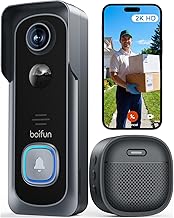 | BOIFUN Video Doorbell Camera Wireless – No Subscription Required, 2K HDBOIFUN Video Doorbell Camera Wireless – No Subscription Required, 2K HD | Budget-focused buyers who want no-subscription monitoring | No-subscription positioning for lower ongoing cost | View on Amazon |
 | Google Nest Doorbell (Battery) – IvyGoogle Nest Doorbell (Battery) – Ivy | Google Home households that want the smoothest Nest integration | Designed to fit naturally into the Google Home/Nest ecosystem | View on Amazon |
1) eufy Security Video Doorbell E340, Dual Cameras, 2K FHD, No Subscription — Most homes that want strong coverage without a monthly fee
If you’re building a shortlist and want an easy pick for most households, start here. You get strong everyday coverage, practical features, and a no-subscription angle that many buyers prefer.
Best for: Most homes that want strong coverage without a monthly fee
Key feature: Dual-camera approach to help capture visitors and packages
Watch for: confirm how you’ll power it (existing wiring vs battery/charging), where recordings are stored (local vs cloud), and whether you need extra chimes, hubs, or a compatible app setup.
🧐 Quick verdict: Best overall baseline for a video doorbell comparison—it’s the easiest pick to measure the rest of the market against.
| Pros ✅ | Cons ⚠️ |
|---|---|
| ✅ Great all-around fit for typical front-door monitoring | ⚠️ You still need to confirm power requirements and mounting location |
| ✅ Appeals to buyers who want to avoid ongoing subscription costs | ⚠️ Local storage and smart alerts can vary by setup—verify what’s included |
| ✅ Strong “baseline” pick for most households | ⚠️ Check chime options, app support, and return terms before committing |
Why it’s a top pick: For most buyers, the “best video doorbell 2027” isn’t the one with the biggest spec number. Instead, it’s the model that captures the whole doorstep reliably, fits your power situation, and won’t surprise you with ongoing costs.
Decision bullets
- Use-case check: decide whether you care more about seeing faces at the door, packages on the ground, or both.
- Power check: verify whether you’re installing on existing doorbell wiring or you’ll be charging a battery (see Video Doorbell Power Requirements).
- Ownership check: confirm how you’ll review clips (local storage vs cloud), and whether you need extra hardware (chime, hub) for your home layout.
SelectRanker tip: A no-subscription doorbell can be a great value. Before ordering, confirm what “no subscription” includes for playback, storage limits, and smart notifications.
2) Ring Wired Doorbell 4K Pro (Newest Model), Retinal 4K with wide-angle video, 10x Enhanced Zoom, and Night Vision, Deep Silver — Wired-only installs chasing the sharpest video and zoom detail
If you already know you want a wired doorbell (no charging and fewer battery-related compromises), this pick targets buyers who prioritize high-detail video. It’s built for a premium “see what happened clearly” experience.
Best for: Wired-only installs chasing the sharpest video and zoom detail
Key feature: Wired power for consistent performance and high-detail capture
Watch for: this is a wired-first decision—confirm your doorbell transformer/power setup, and verify whether the features you care about require a subscription or additional Ring devices in the home.
🧐 Quick verdict: The right choice when you want a wired top video doorbell experience and you’re willing to build around the Ring ecosystem.
| Pros ✅ | Cons ⚠️ |
|---|---|
| ✅ Strong fit for buyers who prefer wired reliability over battery maintenance | ⚠️ Not a fit if you can’t (or don’t want to) use wired power |
| ✅ Prioritizes detailed video capture for identifying people and events | ⚠️ Some app features and storage options may depend on subscriptions—verify before buying |
| ✅ Makes sense for Ring households building a cohesive setup | ⚠️ Confirm compatibility with existing chimes/transformers and any required accessories |
Why it’s a top pick: Wired doorbells can be the simplest long-term ownership play. You avoid a charging routine, reduce “battery saver” compromises, and get more consistent performance—especially on high-traffic front doors.
Decision bullets
- Use-case check: choose this when detail (faces, packages, street-side activity) matters more than a battery-first install.
- Tradeoff check: weigh “wired convenience” against ecosystem lock-in and potential subscription costs for cloud features.
- Compatibility check: confirm wiring/transformer requirements and whether you need an add-on chime or other accessories (see Video Doorbell Power Requirements).
SelectRanker tip: For wired installs, power compatibility is the deal-breaker. Verify it first, then compare video detail, motion alerts, and storage options.
3) REOLINK Battery Video Doorbell (2nd Gen) with Home Hub mini 2K Camera Kit — Battery setup with a hub-style approach for local control/storage
This kit-style pick suits buyers who want the flexibility of a battery doorbell but prefer a more “system” approach. With a hub, storage and connectivity can feel more organized, especially as you add devices.
Best for: Battery setup with a hub-style approach for local control/storage
Key feature: Bundled hub kit to centralize the doorbell system
Watch for: confirm where the hub will live (Wi‑Fi range matters), how recordings are stored, and what the battery/charging routine looks like for your climate and motion volume.
🧐 Quick verdict: Best when you want a battery doorbell but don’t want your setup to feel “single-device-only.”
| Pros ✅ | Cons ⚠️ |
|---|---|
| ✅ A kit approach can simplify managing recordings and devices | ⚠️ Adds another component to place and power (the hub) |
| ✅ Good fit for buyers who want flexibility without committing to wiring | ⚠️ Battery performance depends on traffic, settings, and temperatures—verify expectations |
| ✅ Strong option for expanding beyond a single doorbell over time | ⚠️ Confirm app experience, storage method, and any optional subscriptions |
Why it’s a top pick: Battery doorbells are often bought for convenience. However, they can get frustrating if Wi‑Fi is weak or if storage and notifications feel fragmented. A hub-based kit can make the overall system feel cleaner.
Decision bullets
- Performance check: think about your motion volume (busy street vs quiet porch) because it affects battery life and notification load.
- Compatibility check: confirm the hub placement works with your router location and front-door signal strength.
- Workflow check: decide whether you prefer charging intervals or would rather invest time into a wired install (see Video Doorbell Power Requirements).
SelectRanker tip: If your front door has weak Wi‑Fi, fix that first (mesh node, better router placement) before blaming the doorbell. In practice, battery models are especially sensitive to signal quality.
4) BOIFUN Video Doorbell Camera Wireless – No Subscription Required, 2K HD — Budget-focused buyers who want no-subscription monitoring
This value pick fits shoppers who want a straightforward wireless doorbell camera and want to minimize ongoing costs. It works well when you mainly need “who’s there” coverage without building a full ecosystem.
Best for: Budget-focused buyers who want no-subscription monitoring
Key feature: No-subscription positioning for lower ongoing cost
Watch for: verify exactly how it stores video (local/cloud options), how notifications work, and whether you’ll need extra accessories (chime, SD card, hub, or mounts) for your setup.
🧐 Quick verdict: Best no-subscription value when you want a practical doorbell camera without paying monthly just to review motion.
| Pros ✅ | Cons ⚠️ |
|---|---|
| ✅ Strong fit for cost-conscious shoppers avoiding subscriptions | ⚠️ Value models can vary more in app polish—read recent video doorbell reviews |
| ✅ Wireless format makes it easier to install in rentals or tricky entryways | ⚠️ Confirm storage method and what’s included vs optional |
| ✅ Good shortlist option when you want “good enough” coverage | ⚠️ Battery/charging and Wi‑Fi signal can make or break the experience |
Why it’s a top pick: For many households, the “best” doorbell is the one you’ll actually keep set up. To avoid frustration, watch out for monthly fees, confusing storage rules, or missing accessories you didn’t expect.
Decision bullets
- Fit check: confirm mounting options for your door frame/siding and whether you need an angled wedge mount for the right view.
- Capacity check: think in terms of “storage workflow” (how you’ll review clips) rather than just resolution claims.
- Setup check: verify whether you need a separate chime solution and whether your Wi‑Fi signal is strong at the front door.
SelectRanker tip: With value doorbells, the hidden cost is often accessories and setup time. Check what’s in the box and what you’ll need for day-one use.
5) Google Nest Doorbell (Battery) – Ivy — Google Home households that want the smoothest Nest integration
If your home already runs on Google Home/Nest (displays, speakers, routines), this can be the smoothest “it just fits” option. Notifications and day-to-day monitoring tend to feel simpler inside one ecosystem.
Best for: Google Home households that want the smoothest Nest integration
Key feature: Designed to fit naturally into the Google Home/Nest ecosystem
Watch for: confirm which features you want (clip history, familiar face/person alerts, etc.) and whether they require a subscription or specific Google/Nest devices to get the full experience.
🧐 Quick verdict: Best pick for Google-first homes that want a cohesive video doorbell 2027 setup without juggling multiple apps.
| Pros ✅ | Cons ⚠️ |
|---|---|
| ✅ Best fit when you already use Google Home/Nest devices daily | ⚠️ Some features and video history may require a subscription—verify before buying |
| ✅ Battery format can simplify installation when wiring is inconvenient | ⚠️ Battery doorbells still require a charging routine and good Wi‑Fi signal |
| ✅ Strong choice for households that value ecosystem convenience | ⚠️ Check compatibility with your preferred smart displays/speakers and notification workflow |
Why it’s a top pick: Smart home gear is often won or lost on daily usability. When your household already lives in Google Home, an ecosystem-aligned doorbell can reduce friction with fewer apps, cleaner notifications, and easier shared access.
Decision bullets
- Budget check: include any optional subscription cost if you want extended video history or advanced alerts.
- Use-case check: decide if battery convenience is worth the charging routine, or if you’d rather go wired (see Video Doorbell Power Requirements).
- Risk check: confirm your front-door Wi‑Fi strength and the return policy—signal issues are a common reason doorbells disappoint.
SelectRanker tip: The “best” ecosystem is the one you already use. Mixing ecosystems can work, but it often creates notification overload and more troubleshooting.
How we evaluate best video doorbell options
The SelectRanker scoring lens
To recommend doorbells that make sense for real front doors (not just spec sheets), we focus on what changes daily use and ownership:
- Use-case match, including who the product is for, frequency of use, environment, porch/doorway layout, and the performance level the buyer actually needs
- Useful specifications, focusing on what improves real identification and coverage (field of view, aspect ratio, night visibility, motion zones, and alert reliability)
- Compatibility and setup, including wired vs battery power, transformer requirements, Wi‑Fi strength at the door, chime options, and smart-home ecosystem fit
- Usability and ownership, including app experience, notification control, shared household access, two-way talk workflow, and how easy it is to review clips
- Ownership risk, including subscriptions, local storage options, battery replacement/charging routine, warranty/support, returns, and long-term value
Before you buy: best video doorbell
Skip or slow down if these apply
Don’t buy this if…
- You haven’t decided wired vs battery (this single choice narrows the market dramatically).
- You haven’t checked Wi‑Fi strength at the front door or you can’t place a mesh node/range extender if needed.
- You’re assuming “no subscription” automatically means unlimited storage or the same smart alerts as paid plans.
- You haven’t verified transformer/power compatibility for wired models (see Video Doorbell Power Requirements).
- You don’t know how you want to review clips (phone only, smart display, local hub, cloud history) and who needs access in the household.
Good signs you are ready to buy
Buy this if…
- You know whether you’re going wired or battery and you’ve checked the basics for that path.
- You’ve thought through your porch layout (packages on the ground, stairs, side angle) so you can choose the right viewing coverage.
- You’re comfortable with the storage plan (local vs cloud) and any subscription costs that come with the features you want.
- You want a clear shortlist backed by a practical video doorbell comparison, not endless scrolling.
Buyer’s guide to best video doorbell
Start with your front door: power, angle, and traffic
Your entryway determines what “best” means. A quiet porch can work well with battery power, while a busy walkway (or constant street motion) often pushes buyers toward wired power, tighter motion zones, and better notification control.
Performance and features: what matters for video doorbell reviews
When reading video doorbell reviews, prioritize “can I identify what I need to identify?” over spec hype. In most homes, the best features are the ones that reduce missed events and make clips easy to find later.
- Coverage: look for a view that captures faces and the doorstep area where packages land (when that matters).
- Alerts: motion zones and notification controls matter more than raw resolution for most households.
- Night visibility: check whether your porch lighting is enough and how the doorbell performs after dark.
- Two-way talk: consider whether you’ll actually use it—and how quickly the app connects when someone rings.
Compatibility, size, setup, and ecosystem
Doorbells are “small,” but the compatibility issues aren’t. Wiring/transformers, chimes, Wi‑Fi at the door, smart displays, and household sharing can all make a great model feel like the wrong buy.
If two products solve the same need differently, use the related SelectRanker comparison and buying guides supplied with the page to understand the tradeoff before buying.
Build quality, usability, and included accessories
Look beyond the camera. Mounting hardware, wedge/angle mounts, chime options, and app usability often decide whether the doorbell feels “set and forget” or “constant fiddling.”
Maintenance, recurring costs, parts, and ownership
Doorbells can be low-maintenance or surprisingly ongoing. Battery charging schedules, optional cloud subscriptions, and accessory add-ons (like chimes or hubs) can change the total cost and convenience more than the upfront price.
Warranty, returns, support, and long-term value
Because installation and connectivity vary by home, returns matter. Before you buy, confirm the return window, what “used/installed” returns look like, and what support channels exist if you run into wiring or connectivity issues.
Decision table: buyer concern → what it means → what to check
| Concern | Likely cause | What to check before buying |
|---|---|---|
| You miss deliveries or can’t see packages | Viewing angle doesn’t include the doorstep / package drop zone | Check field of view, aspect ratio, mounting height, and whether an angled wedge mount is included/available |
| The doorbell disconnects or alerts are delayed | Weak Wi‑Fi at the door or congested network | Test signal at the install spot; consider mesh; verify 2.4/5GHz support and app reliability |
| Battery dies too fast | High traffic area, aggressive motion settings, cold weather, or frequent live view | Review battery expectations, motion zone controls, and whether wired power is a better fit |
| Wired install doesn’t work | Transformer/power requirements don’t match the home | Confirm transformer specs and wiring compatibility first (see Video Doorbell Power Requirements) |
| Ownership becomes expensive | Subscription needed for clip history, smart alerts, or cloud storage | Verify what’s included without a plan vs what requires a subscription; compare local storage options |
| Too many false alerts | Motion zones too broad or poor placement/angle | Check motion zone controls, sensitivity settings, and whether the mounting angle avoids street traffic |
| You’re overwhelmed by feature lists | Marketing terms hide the real tradeoffs | Return to basics: power (wired/battery), storage (local/cloud), ecosystem, Wi‑Fi strength, and alert control |
Use the related SelectRanker guides below for deeper category-specific sizing, fit, compatibility, setup, maintenance, and ownership questions.
Common mistakes and quick wins
Quick wins before you buy
- Decide wired vs battery first. It instantly narrows choices and prevents buying a model that doesn’t match your home.
- Stand where the doorbell will mount. Look outward and downward—can you realistically capture faces and packages from that angle?
- Test Wi‑Fi at the door. A doorbell is only as good as its connection when it needs to upload clips and send alerts.
- Read the subscription fine print. “Works without a subscription” and “works well without a subscription” are not the same thing.
Common mistakes
- Buying a wired model without confirming transformer compatibility.
- Choosing purely by resolution while ignoring viewing angle and doorstep coverage.
- Ignoring where recordings will live (cloud vs local) until after installation.
- Assuming any doorbell will work well on weak Wi‑Fi.
- Underestimating battery maintenance for busy entryways or cold climates.
For deeper context, continue with the related SelectRanker guides covering sizing, specifications, compatibility, setup, maintenance, and closely related product comparisons for this topic.
Related SelectRanker guides
- Start here: Best Products hub
- Smart home ecosystem context: Smart Home hub
- Home security context and alternatives: Home Security hub
- Power and wiring help before you choose a model: Video Doorbell Power Requirements
FAQs
1) Wired vs battery: which is better for a best video doorbell setup in 2027?
Wired is usually the better fit for busy front doors because you don’t manage charging and performance is often more consistent. Battery makes sense when you can’t use existing wiring (rentals, no transformer, tricky installs), but you should plan for a charging routine and more sensitivity to Wi‑Fi strength and motion volume.
2) Do I need a subscription to get the best video doorbell features?
Not always, but it depends on what you want day to day. Many doorbells work without a subscription for live view and basic alerts, while cloud clip history and advanced notifications may require a paid plan. Before buying, decide whether you need stored clips, how long you want them saved, and whether local storage is acceptable.
3) In video doorbell reviews, what matters more than resolution?
Coverage and alert reliability matter more. Even a high-resolution doorbell can disappoint if it doesn’t show the doorstep, if motion zones are limited, or if notifications arrive late. Focus on viewing angle/coverage, motion zone controls, night visibility for your porch lighting, and how easy it is to review clips.
4) What power and wiring checks should I make before buying a wired doorbell?
Confirm you have compatible doorbell wiring and a transformer that meets the doorbell’s requirements. If you’re unsure, use: Video Doorbell Power Requirements. When the power doesn’t match, you may need an upgrade or a battery model instead.
5) How can I reduce false motion alerts on a video doorbell?
Start with placement and angle, and avoid pointing directly at the street when possible. Next, use motion zones and sensitivity controls to exclude high-traffic areas. Also verify Wi‑Fi stability because unstable connections can make alerts feel delayed or inconsistent.
6) Is a hub-based kit worth considering for a video doorbell comparison shortlist?
It can be a smart choice if you want a more centralized setup for storage/management or you plan to expand beyond one doorbell. The tradeoff is extra hardware to place and power. If you want the simplest install with the fewest components, a single-device setup may be the better fit.
7) Which ecosystem should I choose: Ring, Google/Nest, or something else?
The best ecosystem is usually the one you already use. If your home runs on Google Home, a Nest-friendly doorbell often feels smoother day to day. If you already have Ring devices, staying in Ring can simplify alerts and management. Mixing ecosystems can work, but it often increases app juggling and notification noise.
8) What should I confirm right before ordering a doorbell online?
Confirm power type (wired/battery), mounting needs (angle/wedge), Wi‑Fi strength at the install spot, storage method (local/cloud), and subscription requirements for the features you want. Finally, check what’s included in the box (chime, hub, mounts) and review return terms since doorbells are often installed before you discover a fit issue.
Final verdict on best video doorbell
If you want the safest first choice, start with Pick #1 because it gives you the cleanest baseline for coverage, storage approach, setup, and ownership cost.
Choose Pick #2 when you’re committed to wired power and you want a high-detail, premium video-first option.
Choose Pick #3 when you want a battery setup but prefer a kit with a hub-style system approach.
Choose Pick #4 when you want no-subscription value and a simpler, budget-friendly buy.
Choose Pick #5 when you’re a Google Home household and ecosystem convenience is the priority.
For more context, continue with the related SelectRanker category hub and guides listed above.