Best Security Cameras 2027: Top 5 Picks Compared
Finding the best security camera gets confusing fast. Brand ecosystems, storage options, power choices, and “AI detection” claims can make two similar-looking cameras feel very different once they’re installed.
This SelectRanker roundup focuses on what changes day-to-day ownership: where the camera goes (indoor/outdoor), how it’s powered (battery/solar/wired/PoE), how it records (local vs cloud), and how easy it is to live with.
Use this as a security camera comparison shortlist. Then confirm the fit checks (Wi‑Fi strength, mounting location, storage plan, and any subscription expectations) before you buy.
Top 3 Security Cameras
Compare the first three reviewed products at a glance.
Disclosure: As an Amazon Associate, SelectRanker may earn from qualifying purchases. We may also earn from other affiliate links. This does not change what we recommend or how we compare products.
#1

eufy Security SoloCam S340, 3K Dual-Lens Solar Security Camera
Editor's Pick
Our top-three picks Rating
Best for
Outdoor buyers who want a simple, low-maintenance setup without running power
Key feature
Solar-powered, wire-free outdoor coverage with a dual-lens design
#2

Blink Outdoor 4 – Wireless smart security camera, two-year battery life, 1080p HD day and infrared night live view, two-way talk. Sync Module Core included – 3 camera system
Strong Choice
Our top-three picks Rating
Best for
Households that want practical outdoor coverage with long battery life per camera
Key feature
Battery-first outdoor cameras with a Sync Module Core included in the system
#3
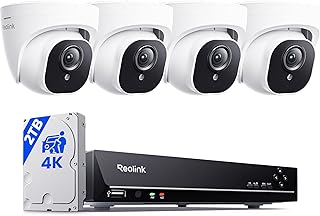
REOLINK 8CH 4K/8MP Home Security Camera System with 2TB HDD RLK8-800D4
Featured Pick
Our top-three picks Rating
Best for
Whole-home setups that prioritize 24/7 recording over battery convenience
Key feature
NVR-style system with included HDD for continuous, centralized recording
This page compares 5 product options, focused on real buying decisions:
- Use-case and fit, including who the product is for, where it will be used, size or fit, portability where relevant, and expected frequency of use
- Performance and compatibility, including the category-specific specifications, dimensions, capacity, connectivity or power needs, included accessories, and setup that affect real use
- Ownership risk, including maintenance, recurring costs, replacement parts, subscriptions where relevant, warranty/support, returns, and long-term value
SelectRanker connects each comparison to the most relevant category hub, related product comparisons, and practical buying guides so you can check the wider context before ordering.
Best Security Cameras 2027: Top 5 Picks Compared
| Image | Product | Best for | Key feature | View on Amazon |
|---|---|---|---|---|
| eufy Security SoloCam S340, 3K Dual-Lens Solar Security Cameraeufy Security SoloCam S340, 3K Dual-Lens Solar Security Camera | Outdoor buyers who want a simple, low-maintenance setup without running power | Solar-powered, wire-free outdoor coverage with a dual-lens design | View on Amazon |
| Blink Outdoor 4 – Wireless smart security camera, two-year battery life, 1080p HD day and infrared night live view, two-way talk. Sync Module Core included – 3 camera systemBlink Outdoor 4 – Wireless smart security camera, two-year battery life, 1080p HD day and infrared night live view, two-way talk. Sync Module Core included – 3 camera system | Households that want practical outdoor coverage with long battery life per camera | Battery-first outdoor cameras with a Sync Module Core included in the system | View on Amazon |
| REOLINK 8CH 4K/8MP Home Security Camera System with 2TB HDD RLK8-800D4REOLINK 8CH 4K/8MP Home Security Camera System with 2TB HDD RLK8-800D4 | Whole-home setups that prioritize 24/7 recording over battery convenience | NVR-style system with included HDD for continuous, centralized recording | View on Amazon |
 | Tapo 1080P Indoor Security Camera, Baby Monitor, Dog Camera, Wired, C100Tapo 1080P Indoor Security Camera, Baby Monitor, Dog Camera, Wired, C100 | Indoor monitoring on a budget (nursery, pets, entryway, apartment living room) | Wired indoor camera that keeps setup simple and avoids battery upkeep | View on Amazon |
 | REOLINK Duo 3 PoE Dual-Lens PoE Security Camera with 180° Panoramic View | F1.6 Color Night Vision, Motion Track, 24/7 Recording, Person/Vehicle/Animal Detection, 2 Way Talk, Up to 512GB microSD CardREOLINK Duo 3 PoE Dual-Lens PoE Security Camera with 180° Panoramic View | F1.6 Color Night Vision, Motion Track, 24/7 Recording, Person/Vehicle/Animal Detection, 2 Way Talk, Up to 512GB microSD Card | Driveways, garages, and side yards where a wide view reduces blind spots | 180° panoramic wide-angle coverage with PoE for always-on power/data | View on Amazon |
1) eufy Security SoloCam S340, 3K Dual-Lens Solar Security Camera — Outdoor buyers who want a simple, low-maintenance setup without running power
eufy Security SoloCam S340 is a balanced “start here” option for outdoor security when you want strong coverage without committing to wiring or a full multi-camera NVR system.
Best for: Outdoor buyers who want a simple, low-maintenance setup without running power
Key feature: Solar-powered, wire-free outdoor coverage with a dual-lens design
Watch for: confirm Wi‑Fi strength at the mounting spot, how/where recordings are stored (local vs cloud), and whether any advanced alerts you want require a subscription or base station in your home setup.
🧐 Quick verdict: Best overall pick if you want outdoor coverage that’s easier to install than wired/PoE, while still feeling “set it and forget it” for everyday use.
| Pros ✅ | Cons ⚠️ |
|---|---|
| ✅ Strong all-around outdoor choice when you don’t want to run power | ⚠️ Placement depends on sun exposure and reliable Wi‑Fi signal |
| ✅ Dual-lens approach can help cover more of the scene from one mount point | ⚠️ Storage method and alert features can vary by ecosystem and plan |
| ✅ Great baseline for comparing battery-only vs PoE/NVR systems | ⚠️ Always verify what’s included (mounting hardware, storage, and any hubs) |
Why it’s a top pick: For many homes, the “best security camera 2027” choice is the one you’ll actually install in the right place. By removing the biggest friction point (power), a solar-capable, wire-free outdoor camera often makes placement easier and coverage more consistent.
Decision bullets
- Use-case check: ideal for outdoor areas where you want coverage without drilling for power or fishing wires.
- Setup check: confirm the mounting surface, sun exposure (for solar charging), and Wi‑Fi signal at the camera location.
- Ownership check: decide how you want to store video (local vs cloud) and verify what’s included vs optional in your ecosystem.
SelectRanker tip: Before you buy any wireless outdoor camera, test Wi‑Fi strength at the intended mount point with your phone. Many “camera problems” are really signal problems.
2) Blink Outdoor 4 – Wireless smart security camera, two-year battery life, 1080p HD day and infrared night live view, two-way talk. Sync Module Core included – 3 camera system — Households that want practical outdoor coverage with long battery life per camera
Blink Outdoor 4 – Wireless smart security camera is a value-oriented pick when you want to cover multiple outdoor spots without jumping straight to a wired install or a full NVR kit.
Best for: Households that want practical outdoor coverage with long battery life per camera
Key feature: Battery-first outdoor cameras with a Sync Module Core included in the system
Watch for: verify how you’ll handle storage (and whether you want cloud recording). Also confirm placement won’t cause constant motion triggers that drain batteries faster than expected.
🧐 Quick verdict: Best value pick when you want a straightforward multi-camera outdoor setup and predictable ownership costs.
| Pros ✅ | Cons ⚠️ |
|---|---|
| ✅ Practical way to cover multiple outdoor angles without running wires | ⚠️ Battery cameras can miss some moments compared with true 24/7 recording systems |
| ✅ Included module helps centralize the setup vs fully standalone cameras | ⚠️ Cloud features and storage options can change the long-term cost |
| ✅ Good “middle ground” between a single camera and a wired NVR kit | ⚠️ Motion-heavy areas can reduce battery life; placement matters |
Why it’s a top pick: Value in security cameras comes down to total ownership. Install difficulty, battery upkeep, storage, and subscription expectations matter more than a single headline spec.
Decision bullets
- Use-case check: best when you want multiple outdoor views (front, backyard, side gate) without wiring.
- Tradeoff check: motion-event cameras are convenient, but they’re not the same as 24/7 continuous recording.
- Compatibility check: confirm the app ecosystem you’re committing to, plus storage options and any add-ons you may want later.
SelectRanker tip: When you compare battery cameras, compare the notification workflow too. In practice, fast and accurate alerts matter more than one extra spec on the listing.
3) REOLINK 8CH 4K/8MP Home Security Camera System with 2TB HDD RLK8-800D4 — Whole-home setups that prioritize 24/7 recording over battery convenience
REOLINK 8CH 4K/8MP Home Security Camera System with 2TB HDD fits buyers who want a more traditional “security system” approach: multiple cameras, centralized recording, and always-on coverage that doesn’t depend on battery charge.
Best for: Whole-home setups that prioritize 24/7 recording over battery convenience
Key feature: NVR-style system with included HDD for continuous, centralized recording
Watch for: plan your cable runs and camera placement up front. You’ll also want to confirm whether you need extra cabling, tools, or weatherproofing accessories for your install.
🧐 Quick verdict: Best for “set coverage and record everything” households that don’t want to rely on motion-only clips.
| Pros ✅ | Cons ⚠️ |
|---|---|
| ✅ 24/7 recording style is ideal for evidence and timeline review | ⚠️ Installation is more involved than battery cameras |
| ✅ Centralized storage can reduce dependence on cloud subscriptions | ⚠️ You must plan cable routing, mounting, and weather exposure |
| ✅ Strong fit for multi-camera, whole-property coverage | ⚠️ Expansion and camera compatibility should be verified before committing |
Why it’s a top pick: After you read enough security camera reviews, a pattern shows up. Battery cameras win on convenience, but whole-home coverage often benefits from continuous recording and centralized storage.
Decision bullets
- Performance check: decide if you truly need 24/7 recording (timeline review) or if motion clips are enough.
- Compatibility check: confirm camera count, channel count, and whether you can add cameras later without replacing the whole system.
- Workflow check: plan cable routing, mounting height, and how you’ll access footage (monitor, app, export options).
SelectRanker tip: For system installs, sketch your camera map first (front door, driveway, backyard, side yard). Then confirm each location can be cabled cleanly—install planning matters as much as the camera specs.
4) Tapo 1080P Indoor Security Camera, Baby Monitor, Dog Camera, Wired, C100 — Indoor monitoring on a budget (nursery, pets, entryway, apartment living room)
Tapo 1080P Indoor Security Camera is the “get coverage today” indoor pick—especially for renters or anyone who wants a simple plug-in camera for a room, crate, nursery, or entryway.
Best for: Indoor monitoring on a budget (nursery, pets, entryway, apartment living room)
Key feature: Wired indoor camera that keeps setup simple and avoids battery upkeep
Watch for: confirm your privacy preferences (camera placement, who has app access, and whether cloud storage is optional). Also check whether local recording is supported if you want it.
🧐 Quick verdict: Best indoor budget pick when you want a straightforward camera for a single room without paying for a whole system.
| Pros ✅ | Cons ⚠️ |
|---|---|
| ✅ Easy indoor setup for renters and small spaces | ⚠️ Needs a nearby outlet and a sensible cable route |
| ✅ Great for pets, packages inside, baby-room check-ins, or entryway monitoring | ⚠️ Indoor cameras raise privacy questions—placement and permissions matter |
| ✅ Simple way to add coverage without a full ecosystem overhaul | ⚠️ Verify storage options and whether features you want require a plan |
Why it’s a top pick: Indoor cameras are usually about convenience and consistency. Because you don’t have to think about charging cycles or battery alerts, a wired indoor camera can be the better everyday experience for a single room.
Decision bullets
- Fit check: confirm you can place it where it sees what you need while still reaching an outlet cleanly.
- Capacity check: decide whether you want 24/7 recording indoors or only motion events, and verify storage options.
- Setup check: confirm Wi‑Fi strength in the room and how multiple users (family/roommates) will share access.
SelectRanker tip: For indoor cameras, treat “privacy controls” like a core spec. Guest access, shared accounts, and notification settings matter.
5) REOLINK Duo 3 PoE Dual-Lens PoE Security Camera with 180° Panoramic View | F1.6 Color Night Vision, Motion Track, 24/7 Recording, Person/Vehicle/Animal Detection, 2 Way Talk, Up to 512GB microSD Card — Driveways, garages, and side yards where a wide view reduces blind spots
REOLINK Duo 3 PoE Dual-Lens PoE Security Camera with 180° is the pick for wide scenes where a standard lens can leave blind spots. Think wide driveways, double garages, or side-yard corridors where you want one camera to cover “left and right” at once.
Best for: Driveways, garages, and side yards where a wide view reduces blind spots
Key feature: 180° panoramic wide-angle coverage with PoE for always-on power/data
Watch for: PoE requires an Ethernet cable run and a compatible power source (PoE switch/injector/NVR). Before ordering, confirm your plan for cabling and power.
🧐 Quick verdict: Best wide-angle coverage choice when you’d rather install one always-on PoE camera than juggle multiple narrower views.
| Pros ✅ | Cons ⚠️ |
|---|---|
| ✅ Wide panoramic view can reduce the need for multiple cameras | ⚠️ PoE installation is more work than Wi‑Fi/battery |
| ✅ Always-on power/data is ideal for 24/7 recording workflows | ⚠️ You must plan Ethernet routing and weatherproofing |
| ✅ Strong fit for driveways and large horizontal scenes | ⚠️ Verify storage method (NVR vs microSD vs app/cloud) for your setup |
Why it’s a top pick: Wide scenes are where many “top security camera” picks disappoint. Either you miss activity at the edge of the frame, or you end up buying two cameras to cover one area. If you can run Ethernet, a wide-angle PoE option is often the cleaner solution.
Decision bullets
- Budget check: factor in PoE needs (cable, switch/injector, possible NVR) as part of total cost.
- Use-case check: best for wide, horizontal coverage where you’d otherwise need multiple cameras.
- Risk check: confirm your recording plan (local continuous recording vs motion clips vs cloud) before committing to the install work.
SelectRanker tip: If you’re willing to run Ethernet, PoE is often the most “boring in a good way” option. You get stable power and stable connectivity.
How we evaluate best security camera options
The SelectRanker scoring lens
To recommend security camera 2027 picks that make sense for real homes, we focus on what changes results and ownership:
- Use-case match, including indoor vs outdoor use, coverage area, mounting location, and whether you need motion clips or 24/7 recording
- Useful specifications, focusing on field of view, night vision behavior, audio needs (two-way talk), and how well the camera can capture usable details for your scenario
- Compatibility and setup, including Wi‑Fi strength, PoE/Ethernet requirements, power access, app ecosystem, and any hubs/modules required
- Usability and ownership, including alert quality, timeline review, multi-user sharing, and how quickly you can pull up live view when it matters
- Ownership risk, including battery upkeep, storage costs (cloud plans), local-storage limitations, warranty/support, and return practicality
Before you buy: best security camera
Skip or slow down if these apply
Don’t buy this if…
- You haven’t decided indoor vs outdoor and whether you need motion clips or 24/7 continuous recording.
- You haven’t checked how the camera will be powered (battery/solar/wired/PoE) and whether that’s realistic for your mounting location.
- You haven’t chosen a storage plan (local storage vs cloud) or you’re not comfortable with the ongoing cost of a subscription if it’s required for the experience you want.
- You haven’t tested Wi‑Fi signal strength where the camera will go, or you haven’t planned cable routing for wired/PoE installs.
- You’re buying solely off one spec (resolution, “AI,” zoom) without verifying field of view, night performance, and the alert workflow you’ll actually use.
Good signs you are ready to buy
Buy this if…
- You know the exact locations you want to cover and what “success” looks like (faces at the door, license plates in a driveway, pet monitoring indoors, etc.).
- You picked a power approach you can support long-term (battery charging, solar exposure, or wired/PoE cabling).
- You understand your storage preference and privacy comfort level (local, cloud, or a mix), and you’ve checked any subscription expectations.
- You want a clear shortlist instead of scrolling through endless listings and mixed security camera reviews.
Buyer’s guide to best security camera
Start with the buyer and real use case
The best security camera for a front porch is often a different product than the best camera for a wide driveway, a nursery, or a full-property setup. Start by listing your camera locations, what you need to capture, and whether you want motion events or a 24/7 timeline.
Performance and features: compare what actually matters
Security camera specs are easy to misread. Instead of chasing a single “best” number, compare the features that change usable footage and usable alerts in your exact environment.
- Coverage: field of view and mounting height matter as much as resolution for capturing what you need.
- Night performance: check how the camera handles low light, glare, and IR reflection from nearby walls.
- Recording style: motion clips are convenient; 24/7 recording is better for timeline review and “what happened before/after.”
- Alerts: the best system is the one that notifies you accurately without constant false alarms.
Compatibility, size, setup, and ecosystem
Most buyer regret comes from setup reality, not camera quality. Verify Wi‑Fi strength, power access, mounting surface, and whether you’re okay committing to the brand’s app and storage approach.
If two products solve the same need differently, use the related SelectRanker comparison and buying guides supplied with the page to understand the tradeoff before buying.
Build quality, usability, and included accessories
Outdoor cameras live in heat, cold, rain, and direct sun. Indoor cameras deal with kids, pets, and daily foot traffic. Check what’s included (mounts, hubs/modules, cables) and look for repeated owner complaints about app reliability, disconnects, or fragile mounts.
Maintenance, recurring costs, parts, and ownership
Battery cameras require charging or battery swaps. Cloud plans can add up. Local storage can be cheaper long-term but may require more setup. Before you commit, decide what you’ll tolerate for the next 2–3 years, not just on day one.
Warranty, returns, support, and long-term value
Security cameras involve privacy and installation choices. Follow the manufacturer’s guidance for placement, power, and weather exposure, and confirm return terms before buying—especially for multi-camera kits and wired installs.
Decision table: buyer concern → what it means → what to check
| Concern | Likely cause | What to check before buying |
|---|---|---|
| The footage isn’t useful when it matters | Field of view, placement, or night performance doesn’t match the scene | Confirm mounting location, coverage width, night behavior, and whether you need a wide-angle or multi-camera approach |
| The camera keeps going offline | Weak Wi‑Fi at the mounting spot or power delivery issues | Test Wi‑Fi strength at the install point; consider wired/PoE if the location is signal-challenged |
| You miss events between clips | Motion-only recording doesn’t capture continuous activity | Decide between motion clips vs 24/7 recording; check storage method and capacity |
| Batteries drain too quickly | High-traffic area, frequent alerts, or cold weather | Review placement, motion zones, and whether solar/wired/PoE is a better fit |
| Ownership becomes expensive | Cloud plans, add-on storage, or missing accessories | Confirm subscription needs, local storage options, and what’s included in the box |
| Alerts are noisy or unhelpful | Poor motion tuning for the environment | Check motion-zone controls, detection types, and how notifications work across household users |
| The feature list feels confusing | Ecosystem differences (storage, hubs, app, recording style) | Return to basics: power method, recording method, storage plan, and install reality |
Use the related SelectRanker guides below for deeper category-specific sizing, fit, compatibility, setup, maintenance, and ownership questions.
Common mistakes and quick wins
Quick wins before you buy
- Map your camera locations first. List each spot (front door, driveway, backyard) and what you need to see there.
- Decide “motion clips vs 24/7” early. This single choice narrows the market faster than comparing brands.
- Pick your storage comfort level. Use Security Camera Local Storage Vs Cloud to decide what you actually want long-term.
- Match the install to the location. Use Wired Vs Wireless Security Cameras to avoid buying a camera that’s unrealistic to power or keep online.
Common mistakes
- Choosing based on resolution alone while ignoring field of view and night behavior.
- Buying a battery camera for a high-traffic area and then being surprised by frequent charging.
- Overlooking storage costs (cloud plans) until after installation.
- Installing too high/too low, aiming through glass, or placing near reflective surfaces that hurt night footage.
- Not planning Wi‑Fi coverage or cable routing before ordering a multi-camera setup.
For deeper context, continue with the related SelectRanker guides covering sizing, specifications, compatibility, setup, maintenance, and closely related product comparisons for this topic.
Related SelectRanker guides
- Explore the broader SelectRanker category guide for this product type: Best Products hub
- Explore smart-home coverage and ecosystems: Smart Home hub
- Explore home-security buying context: Home Security hub
- Compare outdoor-focused picks: Best Outdoor Security Cameras 2027
- Decide on install style: Wired Vs Wireless Security Cameras
- Decide on storage: Security Camera Local Storage Vs Cloud
FAQs
1) What should buyers prioritize when choosing the best security camera?
Start with (1) power and connectivity you can support at the mounting location (battery/solar/wired/PoE + Wi‑Fi strength), (2) recording style (motion clips vs 24/7), and (3) storage plan (local vs cloud). After that, compare alert quality, app usability, and the long-term ownership cost.
2) Is 24/7 recording worth it, or are motion clips enough?
Motion clips are often enough for porch or yard awareness and quick check-ins. However, 24/7 recording is worth it when you want a full timeline (before/after an incident) or when motion triggers might miss key moments. Expect more setup (often wired/PoE/NVR) and more storage planning.
3) Local storage vs cloud: which is better for a security camera 2027 setup?
Cloud storage is convenient for off-site access and can be simple to manage, but it may add recurring cost. Local storage can reduce recurring costs and keep footage in your control, although it can require more setup and storage management. Use Security Camera Local Storage Vs Cloud to match the choice to your comfort level.
4) Wired vs wireless: what’s the biggest real-world difference?
Wireless (battery/solar) is easier to install and easier to move, but it depends on Wi‑Fi strength and battery/solar upkeep. By contrast, wired/PoE takes more work to install, but it’s typically more stable for always-on use and 24/7 recording. See Wired Vs Wireless Security Cameras.
5) What’s the most common outdoor security camera mistake?
Most people buy the camera before planning placement. Outdoor results depend heavily on mounting height, angle, lighting (porch lights, streetlights, headlights), and Wi‑Fi coverage. Even a “better” camera can perform worse if it’s installed in the wrong spot.
6) Do I need a wide-angle camera, or should I use multiple cameras?
Wide-angle makes sense for large horizontal scenes (driveways, wide garages) when you want to reduce blind spots with one mount point. Multiple cameras can be better when you need close-up detail from different angles (door + gate + side yard). Choose based on the scene geometry and how far the subject will be from the lens.
7) How can I compare security camera reviews without getting misled?
Filter reviews by your scenario: indoor vs outdoor, battery vs wired, and whether the reviewer mentions Wi‑Fi strength, mounting height, night lighting, and storage/subscription expectations. Also look for repeated complaints about disconnects, delayed notifications, and hard-to-use playback—those issues affect daily use more than headline specs.
8) What should I check before ordering a security camera?
Confirm the exact model, power method (battery/solar/wired/PoE), storage options (local/cloud), whether any hub/module is required, Wi‑Fi requirements (or Ethernet routing for PoE), what’s included in the box (mounts/cables), and the return terms—especially for multi-camera systems.
Final verdict on best security camera
If you want the safest first choice, start with Pick #1 because it’s a clean baseline for outdoor coverage without running power.
Choose Pick #2 when you want strong value for multi-camera outdoor coverage and a straightforward setup.
Choose Pick #3 when whole-home 24/7 recording and centralized storage are the priority.
Choose Pick #4 when you want an inexpensive, simple indoor camera for a single room.
Choose Pick #5 when wide scenes (like driveways) make panoramic coverage and PoE stability the better fit.
For more context, continue with the related SelectRanker category hub and guides listed above.