Best Smart Locks 2027: Top 5 Picks Compared
The best smart lock search gets confusing fast because listings push different ecosystems, access methods (keypad vs fingerprint), and “no hub required” claims that may not match your door or your smart-home setup.
This SelectRanker guide keeps it practical: match the lock to your door hardware, choose the unlock method your household will actually use, and confirm what you need for remote access and automations.
Use this as a quick smart lock comparison for 2027 shopping. You’ll see who each pick is for, what to verify before ordering, and the main tradeoff that can matter after installation.
Top 3 Smart Locks
Compare the first three reviewed products at a glance.
Disclosure: As an Amazon Associate, SelectRanker may earn from qualifying purchases. We may also earn from other affiliate links. This does not change what we recommend or how we compare products.
#1
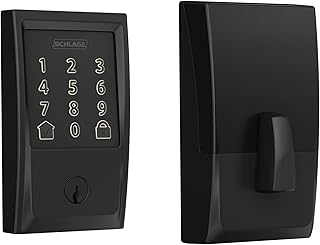
Schlage Encode Smart WiFi Deadbolt Lock with Century Trim, Matte Black
Editor's Pick
Our top-three picks Rating
Best for
Most households that want a dependable Wi‑Fi smart deadbolt with straightforward setup
Key feature
Built-in Wi‑Fi for remote control (no separate bridge required)
#2

eufy Security Smart Lock C220, Fingerprint Keyless Entry Door Lock
Strong Choice
Our top-three picks Rating
Best for
Value shoppers who still want modern access options like fingerprint + app control
Key feature
Fingerprint unlocking for quick entry without sharing codes
#3

Aqara Smart Lock U100, Apple Home Key, Fingerprint Deadbolt, Gray
Featured Pick
Our top-three picks Rating
Best for
Apple households that specifically want Apple Home Key support
Key feature
Apple Home Key for tap-to-unlock from iPhone/Apple Watch (when set up in Apple Home)
This page compares 5 product options, focused on real buying decisions:
- Use-case and fit, including who the product is for, where it will be used, size or fit, portability where relevant, and expected frequency of use
- Performance and compatibility, including the category-specific specifications, dimensions, capacity, connectivity or power needs, included accessories, and setup that affect real use
- Ownership risk, including maintenance, recurring costs, replacement parts, subscriptions where relevant, warranty/support, returns, and long-term value
SelectRanker connects each comparison to the most relevant category hub, related product comparisons, and practical buying guides so you can check the wider context before ordering.
Best Smart Locks 2027: Top 5 Picks Compared
| Image | Product | Best for | Key feature | View on Amazon |
|---|---|---|---|---|
| Schlage Encode Smart WiFi Deadbolt Lock with Century Trim, Matte BlackSchlage Encode Smart WiFi Deadbolt Lock with Century Trim, Matte Black | Most households that want a dependable Wi‑Fi smart deadbolt with straightforward setup | Built-in Wi‑Fi for remote control (no separate bridge required) | View on Amazon |
| eufy Security Smart Lock C220, Fingerprint Keyless Entry Door Lockeufy Security Smart Lock C220, Fingerprint Keyless Entry Door Lock | Value shoppers who still want modern access options like fingerprint + app control | Fingerprint unlocking for quick entry without sharing codes | View on Amazon |
| Aqara Smart Lock U100, Apple Home Key, Fingerprint Deadbolt, GrayAqara Smart Lock U100, Apple Home Key, Fingerprint Deadbolt, Gray | Apple households that specifically want Apple Home Key support | Apple Home Key for tap-to-unlock from iPhone/Apple Watch (when set up in Apple Home) | View on Amazon |
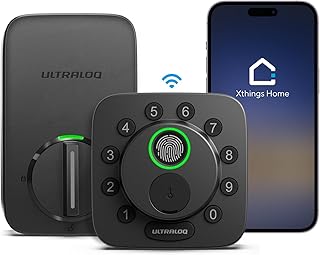 | ULTRALOQ Bolt SE Wi-Fi Smart Lock, Matter Over Thread, App Remote AccessULTRALOQ Bolt SE Wi-Fi Smart Lock, Matter Over Thread, App Remote Access | Smart homes building around Matter/Thread and cross-platform control | Matter over Thread support for broader smart-home interoperability (with a compatible Thread border router) | View on Amazon |
 | Yale August Wi-Fi Smart Lock with Keypad Touch in BlackYale August Wi-Fi Smart Lock with Keypad Touch in Black | Buyers who want a Yale/August-style experience with a touchscreen keypad bundle | Touchscreen keypad for code entry without carrying keys | View on Amazon |
1) Schlage Encode Smart WiFi Deadbolt Lock with Century Trim, Matte Black — Most households that want a dependable Wi‑Fi smart deadbolt with straightforward setup
If you want one top smart lock pick to start with, this is a clean baseline: a full deadbolt replacement with Wi‑Fi remote access and a mainstream, door-first design.
Best for: Most households that want a dependable Wi‑Fi smart deadbolt with straightforward setup
Key feature: Built-in Wi‑Fi for remote control (no separate bridge required)
Watch for: confirm your door prep (deadbolt type, backset, bore hole, door thickness) and decide how you want people to unlock (keypad, app, or both). Also verify the app/ecosystem you plan to use and how guest access is managed.
🧐 Quick verdict: Best overall starting point for a smart lock 2027 upgrade when you want Wi‑Fi convenience without overcomplicating the setup.
| Pros ✅ | Cons ⚠️ |
|---|---|
| ✅ Strong all-around choice for a primary entry door | ⚠️ Door fit details (backset/door thickness) must match before you buy |
| ✅ Built-in Wi‑Fi can simplify remote access planning | ⚠️ Wi‑Fi locks can be more sensitive to router placement and signal strength |
| ✅ Good baseline for comparing Apple/Matter/fingerprint-focused alternatives | ⚠️ Decide in advance how you want to handle guest codes and shared access |
Why it’s a top pick: Most buyers don’t want their front door to become a tech project. Instead, they want reliable daily entry, simple sharing for family and guests, and remote control that works. This pick is a strong all-around match for that goal.
Decision bullets
- Use-case check: decide if this is for a primary entry door, a rental/guest door, or an interior door where remote access matters less.
- Specification check: confirm it’s a deadbolt replacement (not just an add-on) and verify your door measurements and existing deadbolt prep.
- Ownership check: plan battery checks, confirm how the lock behaves during Wi‑Fi outages, and review how access codes/users are managed in the app.
SelectRanker tip: If you’re unsure what “fits,” use our Smart Lock Compatibility Guide before you order—door prep mismatches are the fastest way to turn a good lock into a return.
2) eufy Security Smart Lock C220, Fingerprint Keyless Entry Door Lock — Value shoppers who still want modern access options like fingerprint + app control
This is the “best value” style pick for buyers who want a modern entry experience, especially quick unlocking, without paying extra mainly for a premium brand name.
Best for: Value shoppers who still want modern access options like fingerprint + app control
Key feature: Fingerprint unlocking for quick entry without sharing codes
Watch for: fingerprint convenience is only a win if it works for your household. Confirm how many users you can enroll, choose your backup methods (keypad/app/physical key), and check how remote access is handled in your setup.
🧐 Quick verdict: Best choice when you want a strong feature set per dollar and like the idea of fingerprint entry for daily use.
| Pros ✅ | Cons ⚠️ |
|---|---|
| ✅ Great fit for buyers prioritizing convenience on a budget | ⚠️ Fingerprint performance can vary by user and conditions (wet/dirty fingers, cold weather) |
| ✅ Helps reduce code-sharing and “who knows the PIN?” issues | ⚠️ You still need a solid backup entry plan for guests and emergencies |
| ✅ Strong alternative to the top overall pick when value is the constraint | ⚠️ Verify ecosystem/app expectations if you plan automations or integrations |
Why it’s a top pick: Many households don’t need the most platform-flexible lock. In practice, they want fast entry, easy sharing, and a reasonable total cost of ownership. This pick is built around that value equation.
Decision bullets
- Use-case check: fingerprint is most valuable for busy households that unlock the door multiple times per day.
- Tradeoff check: decide whether you’d rather have fingerprint convenience or tighter integration with a specific ecosystem (Apple Home / Matter / Thread).
- Compatibility check: confirm door measurements, and verify how you’ll manage guest access (temporary codes, app invites, or keypad-only).
SelectRanker tip: If you’re comparing “best smart lock 2027” options for a rental or frequent guests, prioritize simple guest workflows (temporary codes) over unlock methods you won’t actually use.
3) Aqara Smart Lock U100, Apple Home Key, Fingerprint Deadbolt, Gray — Apple households that specifically want Apple Home Key support
If you’re deep in Apple Home and want the tap-to-unlock experience, this pick keeps that requirement at the center of the decision.
Best for: Apple households that specifically want Apple Home Key support
Key feature: Apple Home Key for tap-to-unlock from iPhone/Apple Watch (when set up in Apple Home)
Watch for: Home Key is an ecosystem decision. Confirm you have the Apple Home setup you need (including remote access requirements), then map out who needs access and how you’ll share it.
🧐 Quick verdict: Best when Apple Home Key is a must-have—not just a nice-to-have—and you want unlocking to feel native to iPhone/Apple Watch.
| Pros ✅ | Cons ⚠️ |
|---|---|
| ✅ Purpose-built fit for Apple Home users who want Home Key | ⚠️ Best experience depends on your Apple Home environment and how you manage users |
| ✅ Makes daily entry simple for iPhone/Apple Watch households | ⚠️ If your household is mixed-platform, you may prefer a Matter-first option instead |
| ✅ Strong shortlist pick for ecosystem-focused buyers | ⚠️ Verify door compatibility and your preferred backup entry method before ordering |
Why it’s a top pick: The “best” choice can be ecosystem-specific. When Home Key is your top requirement, generic Wi‑Fi comparisons can waste time. This pick is judged by how well it matches an Apple-first workflow.
Decision bullets
- Performance check: prioritize the unlock workflow you’ll use most (Home Key tap vs keypad vs fingerprint).
- Compatibility check: confirm your door measurements and check any Apple Home requirements for the features you plan to use.
- Workflow check: plan guest access (temporary codes vs app invites) so you’re not forced into sharing personal access later.
SelectRanker tip: If you’re choosing between ecosystems, decide that first—then pick the lock. The “best smart lock” for Apple households can be the wrong buy for mixed-platform homes.
4) ULTRALOQ Bolt SE Wi-Fi Smart Lock, Matter Over Thread, App Remote Access — Smart homes building around Matter/Thread and cross-platform control
This is the fit-focused pick for buyers who care most about smart-home interoperability, especially if you’re building around Matter and Thread rather than one brand’s app.
Best for: Smart homes building around Matter/Thread and cross-platform control
Key feature: Matter over Thread support for broader smart-home interoperability (with a compatible Thread border router)
Watch for: Matter/Thread works best when your home already has the right “plumbing.” Verify you have (or are willing to add) a compatible Thread border router, and confirm which platform you’ll use to run automations day to day.
🧐 Quick verdict: Best for smart-home planners who want a Matter/Thread path and don’t want their front door locked into a single ecosystem.
| Pros ✅ | Cons ⚠️ |
|---|---|
| ✅ Strong option when smart-home compatibility is the priority | ⚠️ Matter/Thread benefits depend on having a compatible Thread border router |
| ✅ Helps future-proof automations across supported platforms | ⚠️ Setup can be more “systems” work than a simple Wi‑Fi-only lock |
| ✅ Great shortlist pick for smart-home builders and tinkerers | ⚠️ Verify which features are handled in-platform vs in the manufacturer app |
Why it’s a top pick: In a smart lock 2027 buying decision, compatibility often decides the winner. Matter/Thread can be a clean route when you want a lock that fits a broader smart-home plan.
Decision bullets
- Fit check: confirm door prep and that your installation environment supports reliable connectivity.
- Capacity check: make sure the ecosystem you’re using supports the user/guest workflow you need (family, cleaners, dog walkers, short-term rentals).
- Setup check: verify Thread border router needs, app account requirements, and how firmware updates are delivered/managed.
SelectRanker tip: Matter is not magic. Plan the controller/border-router piece first, then pick the lock that fits your door and your access workflow.
5) Yale August Wi-Fi Smart Lock with Keypad Touch in Black — Buyers who want a Yale/August-style experience with a touchscreen keypad bundle
This is the alternative pick for buyers who like the Yale/August approach and want keypad-based entry to be the core day-to-day experience.
Best for: Buyers who want a Yale/August-style experience with a touchscreen keypad bundle
Key feature: Touchscreen keypad for code entry without carrying keys
Watch for: confirm how you’ll mount/place the keypad, how codes are created and shared, and what happens if batteries die or connectivity drops. Finally, verify door fit and whether your household needs a physical key backup.
🧐 Quick verdict: Best final shortlist option if you want a keypad-forward smart lock experience and prefer this style of app + access management.
| Pros ✅ | Cons ⚠️ |
|---|---|
| ✅ Touchscreen keypad can be the easiest guest workflow | ⚠️ Keypad placement and daily visibility matter (weather exposure, lighting, privacy) |
| ✅ Solid alternative if Pick #1 or #2 doesn’t match your preferred entry method | ⚠️ Verify how remote access is handled and whether any bridge/hub is involved for your setup |
| ✅ Good fit for households that rely on codes over biometrics | ⚠️ Check battery routine and backup entry plan before you commit |
Why it’s a top pick: A keypad-centric workflow is still one of the most practical solutions for families, guests, and service providers. This pick earns its spot when that’s the priority and you prefer this style of app and access management.
Decision bullets
- Budget check: think in “total setup,” including any extra keypad placement needs and any ecosystem add-ons you may already own.
- Use-case check: keypad entry is often best for guests/cleaners because you can rotate codes rather than share accounts.
- Risk check: confirm battery behavior, backup entry options, and how support/returns work if installation doesn’t fit your door.
SelectRanker tip: If you’re choosing between fingerprint and keypad, pick the method that still works when hands are full, phones are dead, and guests are involved—because that’s when smart locks prove their value.
How we evaluate best smart lock options
The SelectRanker scoring lens
To recommend smart locks that make sense for real homes (not just spec sheets), we focus on what changes daily use and long-term ownership:
- Use-case match, including who the product is for, frequency of use, environment, size or fit, and the performance level the buyer actually needs
- Useful specifications, focusing on the category-specific measurements that affect capacity, speed, image or sound quality, runtime, comfort, fit, range, accuracy, or other real performance
- Compatibility and setup, including dimensions, user or space fit, device ecosystem, connectivity, power or charging needs, accessories, clearances, and installation requirements
- Usability and ownership, including portability, controls, adjustment, ergonomics, storage, noise, cleanup, software where relevant, and how easily the product fits everyday use
- Ownership risk, including maintenance, recurring costs, subscriptions, replacement parts, warranty/support, returns, and long-term value
Before you buy: best smart lock
Skip or slow down if these apply
Don’t buy this if…
- You have not defined the exact use case, fit requirements, budget, or must-have features.
- You are choosing only by one headline feature, brand name, rating, or discount instead of real use-case fit.
- You have not checked dimensions, compatibility, connectivity, setup, space requirements, or other category-specific details.
- The seller does not clearly explain warranty coverage, returns, replacement parts, recurring costs, subscriptions, or required accessories.
- The product has important setup, compatibility, safety, or ownership limits that you do not yet understand well enough to buy confidently.
Good signs you are ready to buy
Buy this if…
- You know the exact use case and real requirements the product must satisfy.
- You understand which features and specifications actually matter for this product category and which are mostly marketing.
- You checked fit, compatibility, setup, maintenance, recurring costs, replacement parts, subscriptions where relevant, warranty/support, and returns before clicking buy.
- You want a clear shortlist instead of scrolling through endless product listings.
Buyer’s guide to best smart lock
Start with the buyer and real use case
For smart locks, “use case” usually means who needs access (family, guests, cleaners), how you want them to unlock (keypad, fingerprint, phone, Home Key), and whether remote control is essential or just a bonus.
Performance and features: compare what actually matters
Smart lock feature lists can look similar at a glance. However, the real differences show up in the unlock workflow and ecosystem support. Start with the methods you’ll actually use, then compare how each lock handles sharing, schedules, and remote access.
- Performance: prioritize consistent unlocking (keypad/fingerprint/phone) over niche features you won’t use.
- Capacity and size: confirm door prep and clearance so the interior/exterior pieces won’t interfere with trim, screens, or storm doors.
- Controls and usability: check app usability, how fast it is to add/remove users, and whether guest access feels simple.
- Portability and setup: plan for installation time, calibration steps, and whether you’ll need to add a hub/Thread border router for the experience you want.
Compatibility, size, setup, and ecosystem
Before ordering, verify the details that most often cause returns: deadbolt type, backset, bore hole size, door thickness, clearance with the door frame, and whether your smart-home ecosystem (Apple Home, Matter/Thread, or app-only) matches the lock you’re buying.
If two products solve the same need differently, use the related SelectRanker comparison and buying guides supplied with the page to understand the tradeoff before buying.
Build quality, usability, and included accessories
A smart lock should feel like a door upgrade, not a gadget. Look for repeated owner feedback about keypad visibility, fingerprint consistency, motor behavior, app reliability, and how well the lock holds up to frequent daily use.
Maintenance, recurring costs, parts, and ownership
Smart locks are “set and forget” only if you plan for batteries, firmware updates, and user management. Before you buy, check battery type, low-battery alerts, how updates are delivered, and whether any features require extra devices (bridges, hubs, Thread border routers) or subscriptions.
Warranty, returns, support, and long-term value
Because smart locks are installed hardware, returns can be annoying if fit is wrong. Before you order, verify return terms, what “used/installed” returns look like, warranty coverage, and the manufacturer’s support path. For safety, follow official installation instructions and rated limits for your door.
Decision table: buyer concern → what it means → what to check
| Concern | Likely cause | What to check before buying |
|---|---|---|
| The product feels underpowered, undersized, or unsuitable | The selected model does not match the real use case or required performance | Compare category-specific performance, capacity, size, features, and intended-use requirements |
| The product does not fit the user, space, or existing setup | Dimensions, fit, compatibility, connectivity, or setup requirements were overlooked | Verify measurements, compatibility, connectivity, power or charging needs, and required accessories before ordering |
| The product is awkward, inconvenient, or slow to use repeatedly | Poor ergonomics, setup time, weight, controls, interface, or workflow fit | Compare handling, controls, portability, setup steps, storage, and everyday convenience |
| Performance or convenience falls short in real use | Battery, capacity, connectivity, software, heat, size, or other category limits are being reached | Check the category-specific limits, compatibility requirements, and real-world usage constraints |
| Ownership becomes expensive | Consumables, accessories, maintenance, or replacement parts cost more than expected | Check recurring items, service access, part availability, and required add-ons |
| Results are inconsistent | Wrong setup, poor adjustment range, weak rigidity, or unsuitable specification | Compare control, calibration, stability, adjustment, and repeatability requirements |
| The feature list feels confusing | Marketing terms and ratings are not directly comparable | Return to the real need: useful features, fit, compatibility, setup, ownership cost, and important limitations |
Use the related SelectRanker guides below for deeper category-specific sizing, fit, compatibility, setup, maintenance, and ownership questions.
Common mistakes and quick wins
Quick wins before you buy
- Pick the unlock method first. Decide whether your household will actually use keypad, fingerprint, phone, or Apple Home Key—then shop within that lane.
- Do the door-measurement check early. Confirm deadbolt type, backset, door thickness, and clearance so you don’t buy a lock that can’t mount cleanly.
- Read the 1-star reviews for patterns. Look for repeated complaints about app reliability, battery drain, connectivity drops, calibration, keypad visibility, fingerprint inconsistency, or support.
- Plan remote access realistically. “Remote” may require Wi‑Fi reliability, a bridge, or a Thread border router; confirm what your chosen ecosystem needs.
Common mistakes
- Buying only because the discount looks huge.
- Choosing by one headline feature (like “Matter” or “fingerprint”) without planning the rest of the setup.
- Assuming every “Wi‑Fi smart lock” has the same remote access and guest-sharing workflow.
- Ignoring door fit, clearance, installation steps, and how the lock behaves during outages.
- Skipping ownership details like battery routine, firmware updates, return terms after installation, and support quality.
For deeper context, continue with the related SelectRanker guides covering sizing, specifications, compatibility, setup, maintenance, and closely related product comparisons for this topic.
Related SelectRanker guides
- Explore the broader SelectRanker category guide for this product type. Best Products hub
- Browse smart-home picks and comparisons for connected devices and automations. Smart Home hub
- Build out your ecosystem and control options across platforms. Smart Home Control hub
- Confirm fit and ecosystem requirements before you buy: Smart Lock Compatibility Guide
FAQs
1) What matters most when choosing the best smart lock?
Start with (1) door compatibility (deadbolt type, backset, door thickness, clearance), then (2) your everyday unlock method (keypad, fingerprint, phone, Apple Home Key), and (3) remote access requirements (Wi‑Fi vs Matter/Thread + border router). After that, compare guest sharing, battery routine, app reliability, warranty, and return terms.
2) Is built-in Wi‑Fi better than a hub or Thread setup?
Built-in Wi‑Fi is often the simplest path if you mainly want remote lock/unlock and app notifications. A hub or Thread setup can make more sense if you’re building a broader smart home and want stronger cross-platform control. In the end, the better choice depends on what you already own and how much setup you want to manage.
3) Are fingerprint smart locks a good idea for a front door?
Fingerprint entry can be a great fit for busy households because it’s fast and reduces PIN sharing. However, biometric performance can vary by user and conditions (wet/dirty fingers, cold weather). Before you commit, make sure you’re comfortable with the backup entry methods (keypad, app, or physical key) for guests and emergencies.
4) What door measurements should I check before ordering a smart lock?
Check your door’s deadbolt prep (backset and bore hole), door thickness, and clearance with the frame and any storm door. Next, confirm ecosystem compatibility (Apple Home Key vs Matter/Thread vs app-only) and what’s required for remote access. If you’re unsure, use the Smart Lock Compatibility Guide.
5) What’s the easiest guest access: keypad codes or app sharing?
For most homes, keypad codes are the simplest guest option because you can create, rotate, and delete codes without teaching someone an app. App sharing can work well for household members, but it often adds friction for short-term access like cleaners, dog walkers, or visitors.
6) Will a smart lock still work if the internet goes out or batteries die?
Most smart locks keep working locally (keypad and/or physical key) even if the internet is down, although remote control and some notifications may not. If batteries die, you’ll need your lock’s backup method (often a physical key and/or an emergency power option, depending on model). Before you buy, confirm the low-battery alerts and your backup entry plan.
7) Do smart locks work with Apple Home, Alexa, or Google Home?
Some do, but not all in the same way. Apple Home Key is a specific feature and it’s not the same as “works with Apple Home.” Matter can improve cross-platform compatibility, but you may still need the right controller/border router. Always verify the exact integration you care about (voice control, automations, Home Key, remote access) on the product page before ordering.
8) What should I double-check right before I click buy?
Confirm the exact model, door fit measurements, your preferred unlock methods, ecosystem compatibility, remote-access requirements (Wi‑Fi vs hub/Thread), included accessories (like a keypad), battery type, warranty/returns, and repeated buyer complaints about connectivity, calibration, or app reliability.
Final verdict on best smart lock
If you want the safest first choice, start with Pick #1 because it gives you the cleanest baseline for use-case fit, useful features, compatibility, setup, and ownership risk.
Choose Pick #2 when its focused advantage (value + fingerprint convenience) solves your main constraint better than the overall pick.
Choose Pick #3 when Apple Home Key is the priority and you want an Apple-first workflow.
Choose Pick #4 when Matter/Thread compatibility is central to your smart-home plan.
Choose Pick #5 when a keypad-forward Yale/August-style experience is the better match for your household.
For more context, continue with the related SelectRanker category hub and guides listed above.